

Disclosure: This post contains affiliate links. I may earn a commission at no extra cost to you, which helps keep these reviews ad-free.
TL;DR / Quick Verdict
Rating: 8.5/10 for small businesses, freelancers, and social media managers.
Metricool is an all-in-one social media management platform that covers scheduling, analytics, competitor tracking, and ads reporting in one dashboard. It is especially strong for multi-brand management, and its free plan lets you test the core workflow before paying anything.
Best for: Freelancers and agencies managing several brands, small teams that want analytics and scheduling in one place, and creators who post across multiple networks.
Skip if: You need deep enterprise approval workflows, very advanced social listening, or you only post on a single network and never look at analytics.
What Is Metricool?

Metricool is a social media management and analytics tool. You connect your social accounts, schedule posts, measure performance, and track competitors from one place. It supports the major networks, including Instagram, Facebook, TikTok, LinkedIn, YouTube, Pinterest, and X, and it also offers Google and Meta ad reporting.
The main idea is simple: instead of switching between a scheduler, an analytics app, and a reporting tool, you manage the whole workflow in one dashboard.
Key Features
Post Scheduling and Calendar
The planner lets you schedule posts across networks from a single calendar view. You can draft, review, and queue content for the week or month ahead. This is the feature most users start with, and it is where the time savings show up first.
Analytics and Reporting
The analytics cover engagement, reach, follower growth, and post-level performance. You can compare accounts side by side and export reports, which is useful when you need to show clients results. Reporting depth depends on your plan, so check which exports are included before you commit.
Competitor and Hashtag Analysis
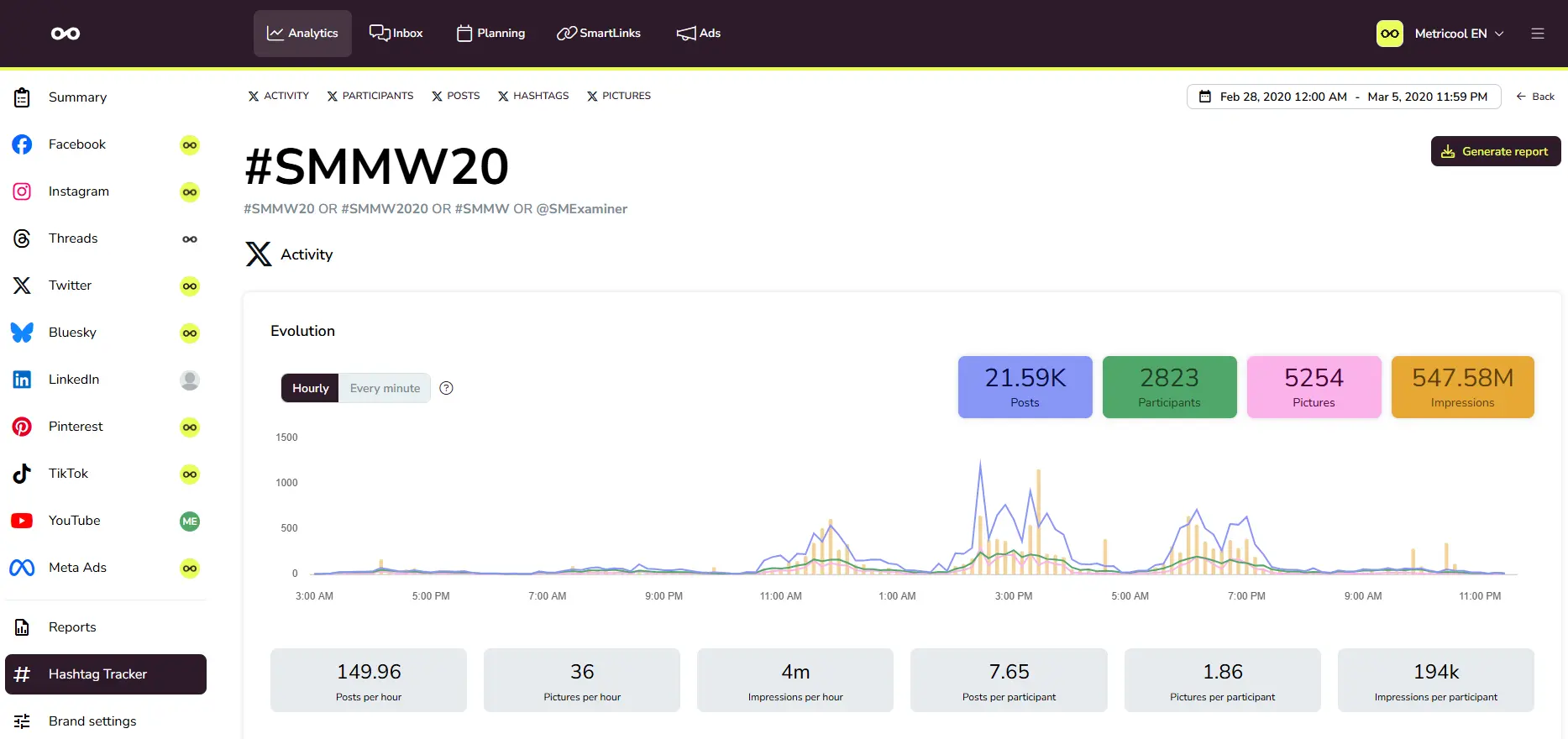
You can track competitor accounts and monitor hashtags to see what content is performing in your niche. This makes it easier to plan content around what is already working, rather than guessing.
Ads Reporting
The platform connects to Google and Meta ad accounts so you can review campaign performance next to your organic results. For marketers who run both paid and organic campaigns, this keeps everything in one place.
Developer Options: API and MCP
It offers an API for teams that want to pull data into their own dashboards or automate workflows. It also has MCP support, which lets AI tools connect to your Metricool data. If you build internal reporting or work with AI assistants, these options are worth exploring.
Hands-on Walkthrough
Setting Up Your First Brand
Setup starts with creating a brand and connecting your accounts through the standard login flow. Once connected, the dashboard pulls in historical data, so you can review past performance from day one. The learning curve is gentle, and most of the core screens are easy to find.
Planning a Week of Content
Open the calendar, draft your posts, attach media, and schedule them for the best time slots. For short-form video, the platform includes tools for Reels and Stories. If you want to add music to a Reel, the process runs through the platform’s native editing options, so check that the feature is available for your account type before you plan around it.
Reviewing Results
After a week or two, the analytics view shows which posts drove the most engagement. Use that data to adjust your posting times and content format. This feedback loop is where Metricool earns its keep over time.
Metricool Pricing 2026
The platform offers a free plan and paid tiers that scale with the number of brands and features you need. Pricing is based on how many brands you manage, not how many team members you add, which makes it attractive for agencies and teams.
| Plan | Best For | What You Get |
|---|---|---|
| Free | Testing the platform | Core scheduling and basic analytics for a single brand |
| Starter | Solo creators and small businesses | Expanded scheduling, deeper analytics, and more brands |
| Advanced | Agencies and growing teams | Advanced reporting, competitor tracking, and team features |
| Custom | Large agencies and organizations | Tailored brand limits, white-label options, and dedicated support |
Note: Prices and plan limits change often, and third-party sites report different numbers. Always check the current price on the official pricing page before you buy.
User Reviews: What People Say
Reviews on Capterra and GetApp are generally positive, with users praising how easy the platform is to learn and how well it handles scheduling. Common praise includes the clean interface and the value of having analytics alongside publishing.
The recurring criticisms are about cost and feature gating. Some users feel advanced reporting and team features require higher-tier plans, and a few report limitations with notifications and less popular networks. Reading the reviews alongside the current plan details will give you a realistic picture.
Metricool vs Alternatives
| Tool | Best Known For | Who It Suits |
|---|---|---|
| Metricool | Scheduling plus analytics and ads reporting | Multi-brand managers and small teams |
| Buffer | Simple, clean scheduling | Solo creators who want minimal features |
| Hootsuite | Enterprise social management | Large teams with complex approval workflows |
| Agorapulse | Social inbox and engagement | Teams focused on community management |
| Later | Visual planning for Instagram | Visual-first brands |
Best Use Cases
Who should use Metricool:
- Freelance social media managers handling several client accounts from one dashboard.
- Small businesses that want scheduling and analytics without paying for separate tools.
- Creators posting across multiple platforms who need to know which content performs best.
- Marketers who want organic social and ads reporting in one place.
Who should skip it:
If you need complex enterprise approval chains or advanced social listening across the entire web, a specialized enterprise platform will fit better.
Pros & Cons
✅ Pros
- All-in-one scheduling, analytics, and competitor tracking
- Pricing based on brands, not users
- Free plan for testing the core workflow
- Easy to learn for beginners
- API and MCP options for developers and AI workflows
❌ Cons
- Advanced reporting and team features sit behind paid plans
- Plan limits and prices change often
- Some users report gaps with less popular networks
- Not built for complex enterprise workflows
FAQ
Is Metricool free?
Yes, it offers a free plan with core scheduling and basic analytics. Paid plans unlock more brands, deeper reporting, and team features.
Does Metricool have an API?
Yes, it offers an API for teams that want to pull data into their own tools or automate reporting. Check the developer documentation for current endpoints and access requirements.
Can I add music to a Reel in Metricool?
The platform supports short-form video planning and publishing. Music options depend on the platform and your account type, so check the current feature list for your network before planning around it.
Is Metricool better than Buffer?
It depends on your needs. Buffer is simpler and focused on scheduling. It adds analytics, competitor tracking, and ads reporting, which makes it stronger for users who need data as well as publishing.
Who is Metricool best for?
It is best for freelancers, agencies, and small teams managing multiple brands who want scheduling and analytics in one dashboard.
Final Verdict
Metricool is a practical, well-rounded tool for anyone who manages social media across several accounts. It combines scheduling, analytics, competitor tracking, and ads reporting in one place, and its brand-based pricing makes it good value for agencies and teams.
It is not the cheapest option for every user, and advanced features sit behind paid plans. But if you want one dashboard that handles publishing and performance, it is one of the strongest choices available right now.