

You’ve hit the wall. Every AI tool you try is just another chat box — scroll up, lose context, start over. You’re context-switching between five tabs before 10 AM, and your “AI workflow” is mostly copy-paste. That’s not deep work. That’s digital chaos.
Flowith AI fixes this at the root level. Instead of another linear chatbot, it gives you an infinite 2D canvas where ideas branch, agents execute, and your entire knowledge base works with you. After one million users and a #1 Product Hunt ranking, the question isn’t whether Flowith is interesting — it’s whether it’s right for you.
This is the most thorough, no-hype Flowith review you’ll find in 2026. Let’s get into it.
What Is Flowith AI? (Definition + Context)
Flowith AI is an agentic AI workspace that replaces the traditional chat interface with an infinite canvas, letting you think, create, and execute complex multi-step tasks in a single unified environment.
- Founded in 2023 by Yichen Wu and Derek Nee (CEO), backed by YC China
- Headquartered in Shanghai; used globally across 190+ countries
- Surpassed 1 million users after Agent Neo launched in May 2025
- Attracts 780,500+ monthly visitors with an average session duration of 5:12 minutes [Toolify, 2025]
- Recognized by MIT Technology Review and AI Superhuman as a leading agent startup
Stop juggling tools. Try Flowith Free →
Key Features & Benefits of Flowith AI
🗺️ Infinite Canvas Interface
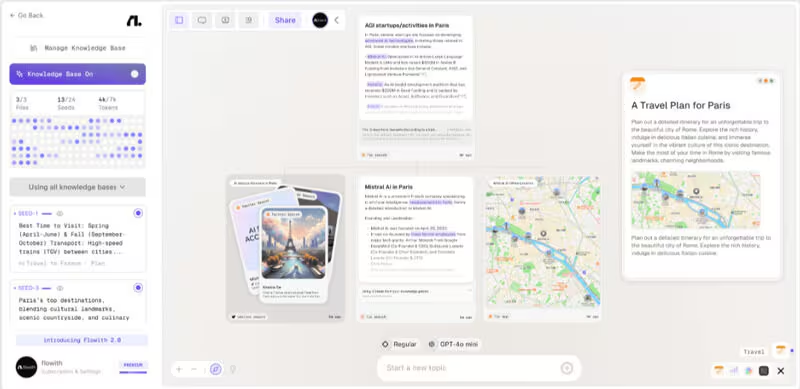
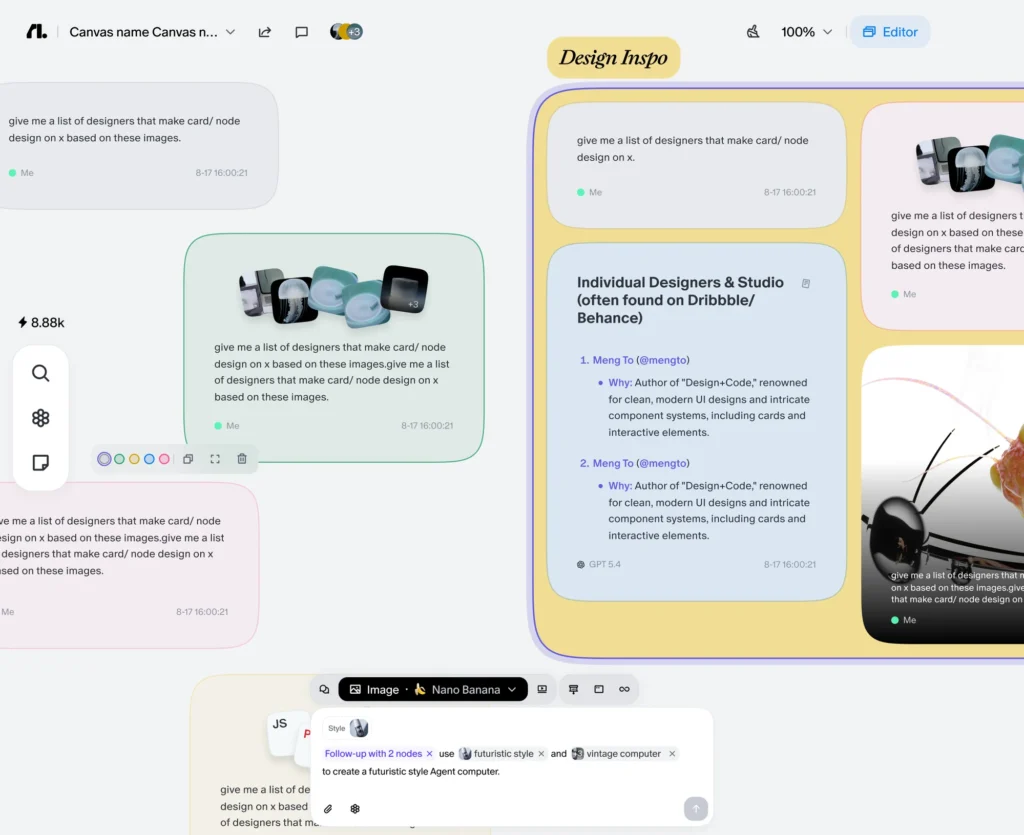
Most AI tools trap you in a vertical scroll. Flowith replaces that with an infinite 2D canvas where every prompt and response becomes a movable visual node. You branch conversations, create parallel threads, connect related ideas spatially, and see the full scope of a project at a glance.
For complex research or writing projects, this spatial layout is not a gimmick — it fundamentally changes how you process information. Users who previously spent hours scrolling through old chat history now navigate with a single glance. First-time users typically need 15–20 minutes to adapt, but the payoff is immediate for multi-threaded work.
🤖 Agent Neo — The Autonomous Execution Engine
Agent Neo is Flowith’s flagship autonomous agent. It operates with:
- A 10 million token context window (roughly 7,500 pages of text)
- The ability to execute 1,000+ inference steps without interruption
- Built-in web search, document analysis, code execution, and synthesis
In real-world testing, Agent Neo completed a full competitor analysis — data pull, organization, and draft report — in under 20 minutes. Testers also generated a complete 3D interactive website in under five minutes. For developers, it can handle full-stack application logic, frontend design, and database schema in a single coordinated session.
What most Flowith reviews miss: Agent Neo isn’t just “fast.” Its Oracle AI system self-corrects mid-task. Rather than following rigid scripts, it dynamically adapts its execution plan based on intermediate results. This is the difference between a macro and actual intelligence.
🌱 Knowledge Garden — Your Personalized Second Brain
Upload documents, notes, or web pages and Flowith atomizes them into discrete knowledge units called Seeds. When you work on the canvas, the AI draws from your Seeds rather than generic training data — giving you responses grounded in your actual source material.
- No token cost for Knowledge Garden conversations (storage only)
- Automatically surfaces unexpected connections between documents
- Researchers report 60–80% reduction in literature review time [max-productive.ai, 2026]
This is especially powerful for content creators, consultants, and researchers who work with proprietary data that public AI models simply don’t know.
🧠 40+ AI Models in One Workspace
Flowith provides access to GPT-5, Claude Opus, DeepSeek, Gemini, DALL-E 3, Stable Diffusion, and more — all under a single credit system. You switch models mid-conversation without losing context, optimizing for cost, speed, or capability as the task demands.
For context: paying separately for GPT-5 + Claude Opus + image generation would run $60–$100+/month. Flowith’s Professional plan covers all three for $19.90/month.
🖼️ Visual Creation: Images, Video & Slides
Beyond text, Flowith handles:
- Image generation and editing (DALL-E 3, Stable Diffusion, Midjourney integration)
- Video generation on Professional tier and above (note: video tasks consume credits rapidly — 475–6,000 credits per clip)
- Presentation and slide creation without leaving the canvas
👥 Real-Time Collaboration
Multiple team members can edit the same canvas simultaneously. For distributed teams doing collaborative research or content planning, this removes the usual friction of async handoffs.
Who Should Use Flowith AI?
Flowith is not for everyone. Here’s an honest breakdown:
Best fit:
- Content creators & writers running multiple long-form projects simultaneously — 60–80% time savings documented
- Researchers & academics managing large document libraries and parallel hypotheses
- Software development teams building full-stack applications that need sustained context across sessions
- Creative agencies handling multi-project creative workflows and client presentations
- Startup founders who need to context-switch between strategy, code, and creative — all in one session
- Consultants & knowledge workers who want AI grounded in their data, not generic internet answers
Not the best fit:
- Casual users wanting a quick one-off answer (ChatGPT is faster for this)
- Developers needing targeted code suggestions (GitHub Copilot wins for narrow IDE tasks)
- Teams needing app-to-app automation pipelines (Zapier or Make are better here)
- Users on tight budgets who won’t use advanced agents (the free tier’s 300 credits won’t go far)
Flowith AI vs. Competitors
| Feature | Flowith | Notion AI | ChatGPT Plus | Manus |
|---|---|---|---|---|
| Infinite canvas | ✅ | ❌ | ❌ | ✅ |
| Autonomous agent | ✅ Agent Neo | ❌ | Limited | ✅ |
| Context window | 10M tokens | — | 128K | ~128K |
| Multi-model access | 40+ models | 1 (GPT) | 1 (GPT-4o) | Limited |
| Knowledge base | ✅ Seeds | ✅ | ❌ | Partial |
| Image generation | ✅ | ❌ | ✅ | Limited |
| Video generation | ✅ (Pro+) | ❌ | ❌ | ❌ |
| Real-time collab | ✅ | ✅ | ❌ | ❌ |
| Starting price | Free / $19.90/mo | $16/mo | $20/mo | ~$39/mo |
| GDPR compliant | ✅ | ✅ | ✅ | ✅ |
Contrarian take: Most comparisons pit Flowith against Notion or ChatGPT. That’s the wrong frame. Flowith is genuinely closer to a lightweight operating system for AI work than it is to a writing assistant. If you’re evaluating it as “a better chatbot,” you’ll underestimate it — and probably under-use it.
Pros and Cons of Flowith AI
✅ Pros
- Infinite canvas changes the game for complex, multi-threaded projects — not a UI gimmick
- Agent Neo’s 10M token context handles entire codebases or document libraries without losing the thread
- Knowledge Garden dramatically personalizes AI outputs using your own source material
- 40+ models in one subscription — extraordinary value versus paying per platform
- Self-correcting Oracle AI adapts mid-task without you micromanaging prompts
- Real-time collaboration removes async friction for distributed teams
- GDPR compliant + HIPAA via BAA on qualifying plans — enterprise-ready
❌ Cons (Honest)
- Steep learning curve — plan 1–2 hours to internalize the canvas logic; unsuitable for quick one-off queries
- Credit system burns fast — video generation and premium models like GPT-5 consume credits at a pace that surprises new users; budget carefully
- Limited file type support — not all file formats are accepted across all agents; expect this to improve but it’s a current gap
- Free tier is minimal — 300 one-time credits barely scratches the surface; treat it as a demo, not a usable plan
- Not built for simple tasks — the overhead of the canvas interface adds friction for queries that a basic chatbot handles in seconds
Visit my previous reviews:
Arcads AI Review,
MagicLight AI Review.→]
Flowith Pricing & Where to Buy
All plans include access to Flowith Web, FlowithOS, and Flowith iOS.
| Plan | Monthly Price | Annual Price | Credits | Concurrent Tasks |
|---|---|---|---|---|
| Starter | Free | Free | 300 (one-time) | Limited |
| Professional | $19.90/mo | ~$15.32/mo | 22,000/mo | 50 |
| Ultimate | $49.90/mo | ~$39.92/mo | 85,000/mo | 100 |
| Infinite | $499.90/mo | ~$459.90/mo | 1,000,000/mo | Unlimited |
Credit consumption notes:
- Text (GPT-3.5): ~100 credits/million tokens
- Text (GPT-5): ~15,000 credits/million tokens
- Images: 20–190 credits depending on quality
- Video: 475–6,000 credits based on length/resolution
- Knowledge Garden conversations: zero credit cost
Flowith also donates 1% of revenue to Stripe Climate for permanent carbon removal — a rare sustainability commitment among AI tools.
→ Start Free on Flowith.io
→ See Full Pricing Details
What Most Flowith Reviews Miss
Every review covers the canvas and Agent Neo. Almost none of them mention this: the Oracle AI system’s self-correction loop is what separates Flowith from tools that are merely fast.
Most autonomous agents fail silently — they hit a dead end and either loop or hallucinate a way out. Oracle adapts its task recipe mid-execution based on what intermediate results actually show. In practice, this means Agent Neo doesn’t just complete tasks faster; it completes tasks that other agents simply give up on.
That’s not a feature you see in a screenshot. It’s something you only discover after running the tool on real, messy, open-ended work.
Final Verdict: Is Flowith AI Worth It?
Flowith AI is the most genuinely different AI workspace available in 2026. The infinite canvas isn’t a cosmetic update — it restructures how you interact with AI at the level of working memory. For researchers, writers, developers, and creative professionals who regularly tackle projects too large for a single chat session, Flowith delivers a category-defining advantage.
At $19.90/month, the Professional plan gives you access to 40+ AI models that would cost $60–$100+ across separate subscriptions. The Knowledge Garden alone pays for itself in research time saved. The learning curve is real, and light users will find simpler tools more efficient. But for deep work, Flowith is in a category of its own.
If you work with complex, multi-threaded projects and you’re still using linear chat — you’re leaving serious productivity on the table. Start with the free tier, spend an hour on the canvas, and see if it clicks. Most users don’t go back.
Frequently Asked Questions About Flowith AI
Q1: What is Flowith AI and how does it work?
Flowith AI is an agentic workspace that uses an infinite 2D canvas instead of a linear chat. You place prompts as visual nodes, branch conversations in multiple directions, and use Agent Neo — an autonomous AI — to execute multi-step tasks across 40+ AI models within a single session.
Q2: Is Flowith AI free to use?
Yes, Flowith offers a free Starter plan with 300 one-time credits. This is enough to explore the interface but insufficient for sustained use. The Professional plan at $19.90/month provides 22,000 monthly credits and full access to 40+ models, and is where most users find real value.
Q3: How does Flowith’s Knowledge Garden work?
The Knowledge Garden lets you upload documents, notes, and web content. Flowith breaks these into small knowledge units called Seeds. When you work on the canvas, the AI draws from your Seeds to generate context-aware, personalized responses. Knowledge Garden conversations do not consume credits.
Q4: Who is Flowith AI best for?
Flowith is best suited for content creators, researchers, software developers, creative agencies, and startup founders who regularly work on complex, multi-step projects. It is less suited to users who need quick single-question answers or narrow code suggestions.
Q5: How does Flowith compare to ChatGPT?
ChatGPT uses a linear chat interface with a single AI model. Flowith offers an infinite canvas, 40+ AI models, autonomous task execution via Agent Neo, and a personalized knowledge base. For simple queries, ChatGPT is faster. For complex deep work, Flowith provides a fundamentally different level of capability.
Q6: Is Flowith AI safe and GDPR compliant?
Yes. Flowith is GDPR compliant and offers HIPAA compliance via a Business Associate Agreement (BAA) on qualifying enterprise plans. The platform is backed by YC China and has been reviewed by MIT Technology Review.
Q7: What happens if I run out of credits on Flowith?
You can upgrade your plan or wait for your monthly credit renewal. Credits vary significantly by model and task type — video tasks are the fastest consumers. The Knowledge Garden is credit-free. Flowith recommends starting with the Professional plan to assess your actual usage before committing to higher tiers.