
Deevid AI Review (2025) :
Creators face a constant challenge: producing engaging video content without spending hours on editing. Is Deevid AI Worth It for solving this problem? I invested $297 and three weeks testing every feature to find out.
This AI video generator promises to turn text, images, and videos into professional content within minutes. The platform targets content creators, marketers, and businesses looking to scale video production without hiring editors or learning complex software.
After extensive testing with various ai animation styles and formats, I discovered significant strengths and notable limitations. This review covers real performance data, pricing analysis, and practical alternatives to help you make an informed decision.
What makes Deevid AI useful for users?
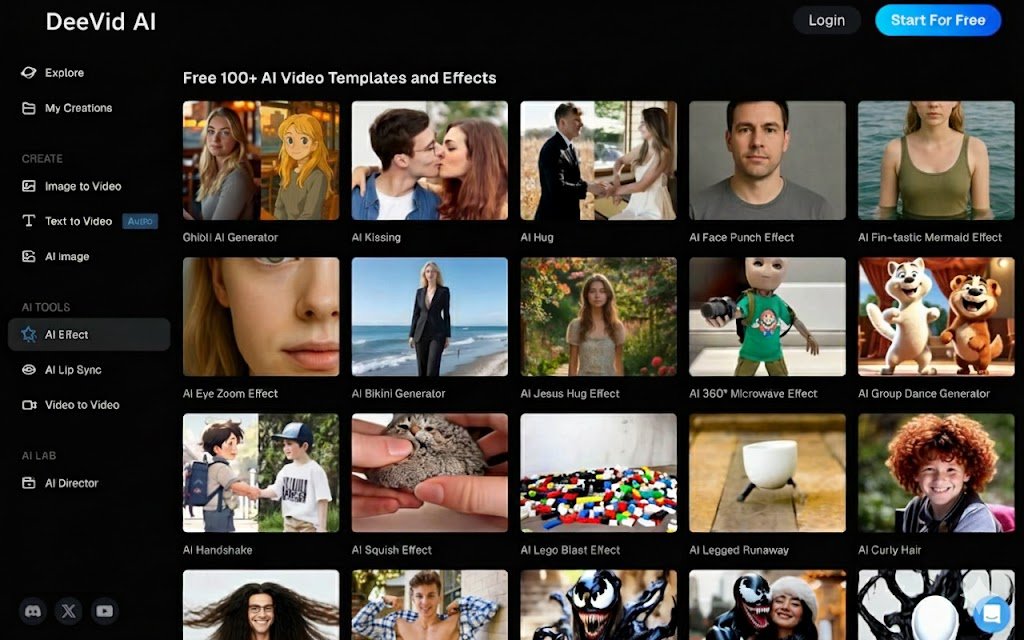
Deevid AI operates as an all-in-one AI Video Generator with three core input methods. Users can start with text prompts, static images, or existing video clips. The platform processes these inputs through advanced AI models to generate polished video content.
The text-to-video feature accepts written descriptions and produces complete scenes with synchronized audio. You write what you want to see, and the AI generates matching visuals with voiceovers. This works well for explainer videos, social media clips, and advertising content.
Image-to-video animation brings static photos to life. Upload product shots, portraits, or graphics, and the system adds motion, transitions, and camera movements. E-commerce businesses use this feature to showcase products without filming.
Video-to-video transformation applies new styles to existing footage. Change the aesthetic, add filters, or modify the overall mood of your content. This saves time when repurposing old material for different platforms or audiences.
The platform offers three AI models for different needs:
- Fast V2.0: Generates videos quickly for rapid prototyping and social content
- Quality V2.0: Produces higher resolution outputs with better detail
- Master V2.0: Includes advanced audio features and lip-sync capabilities for character dialogue
Cross-video character consistency maintains the same character across multiple scenes. This feature helps creators build narrative content with recurring subjects without manual editing. When evaluating Is Deevid AI Worth It, this capability stands out for serialized content production.
Over 100 pre-built templates provide starting points for common video types. These include trending effects, holiday greetings, Ghibli-style animations, and social media formats. Templates reduce production time for standard content needs.
| Feature | Capability | Use Case |
|---|---|---|
| Text-to-Video | Full scene generation with audio | Explainer videos, ads |
| Image-to-Video | Animated photo transformation | Product demos, social posts |
| Video-to-Video | Style transfer and effects | Content repurposing |
| AI Lip-Sync | Synchronized character dialogue | Animated spokespersons |
| Templates | 100+ pre-built formats | Quick content creation |
How does Deevid AI work?
Deevid AI processes inputs through machine learning models that understand context and generate relevant visual content. The system analyzes your prompt or upload, then creates video frames based on learned patterns from training data.
Main functions: The core workflow starts with input selection. Choose between text descriptions, image uploads, or video files. Add optional parameters like style preferences, duration, and effects. Click generate and wait for processing.
Input formats: Text prompts accept natural language descriptions. Image uploads support JPG, PNG, and WebP formats. Video inputs handle MP4 and MOV files up to specified size limits.
Output quality: Standard generations produce 720p resolution. Premium tiers unlock 1080p outputs. Frame rates reach 30 FPS for smooth playback. Video length caps at 10 seconds per generation with standard credits.
Processing speed: Generation times vary by model selection. Fast V2.0 completes in 30-60 seconds. Quality V2.0 takes 1-2 minutes. Master V2.0 with audio requires 2-4 minutes per video. Network congestion and server load affect these times.
Platform integrations: Web-based interface works across browsers without software installation. Mobile apps available for iOS and Android devices. Direct sharing to social platforms from the dashboard. Export files download as MP4 format for external use.
API access: Enterprise plans include API endpoints for automated workflows. Developers integrate video generation into existing applications. Batch processing available through API calls. Rate limits apply based on subscription tier.
Customization options: Adjust creativity sliders to balance prompt adherence versus artistic interpretation. Negative prompts exclude unwanted elements from generations. Camera movement controls set pan, zoom, and rotation preferences. Aspect ratio selection covers 16:9, 9:16, and 1:1 formats.
Step-by-Step Usage Guide :

Step 1: Create Account and Choose Plan
Visit the official website and sign up with email or social login. Select between free trial or paid plan based on generation needs. Free accounts include watermarked outputs and limited credits.
Tip: Start with the free tier to test features before committing to paid plans.
Step 2: Select Input Method
Navigate to the dashboard and choose your input type. Text-to-video requires written prompts. Image-to-video needs photo uploads. Video-to-video accepts existing footage.
Tip: Use detailed prompts for text inputs. Include subject, action, setting, and mood for better results.
Step 3: Configure Generation Settings
Pick the AI model based on speed versus quality needs. Set video duration and aspect ratio. Apply templates if using pre-built formats. Add optional effects or transitions.
Tip: Quality V2.0 provides the best balance for most projects.
Step 4: Generate and Review
Click the generate button and monitor progress. Review the output once complete. Check for visual artifacts, motion quality, and prompt adherence. Regenerate if results miss expectations.
Tip: Generate multiple variations to find the best output. Credits regenerate monthly.
Step 5: Export and Share
Download the final video as MP4 file. Remove watermarks on paid plans. Share directly to social platforms or save for later editing. Use exported files in larger projects or campaigns.
Tip: Export at highest available resolution for maximum flexibility.
Is Deevid AI Worth It? Pricing Breakdown :
Deevid AI operates on a credit-based subscription model. Each video generation consumes 5 credits. Monthly allocations vary by plan tier.
Free Plan: Test the platform with limited features. Includes watermarked outputs and restricted resolution. No credit card required for trial access. Limited to 720p exports.
Lite Plan ($14/month): Provides 200 monthly credits for 40 video generations. Removes watermarks from outputs. Unlocks 720p resolution. Grants professional mode access. Includes full commercial licensing rights for business use.
Pro Plan ($35/month): Delivers 600 monthly credits for 120 videos. Upgrades to 1080p resolution. Adds priority customer support. Provides early access to new features. Suitable for regular content creators and small businesses.
Premium Plan ($159/month): Offers 3,000 monthly credits for 600 generations. Maintains 1080p output quality. Includes priority processing for faster generation times. Provides comprehensive support options. Enterprise-level commercial usage permissions. Best for agencies and high-volume users.
Billing cycle: All plans bill monthly with annual payment options for discounts. Credits reset at billing cycle start. Unused credits do not roll over to next month. Understanding the cost structure helps answer Is Deevid AI Worth It for your budget.
Trial details: Free tier available without payment information. Test core features with watermarked outputs. Upgrade anytime to unlock full capabilities.
| Plan | Price/Month | Credits | Videos | Resolution | Key Features |
|---|---|---|---|---|---|
| Free | $0 | Limited | ~5 | 720p | Watermarked, Basic features |
| Lite | $14 | 200 | 40 | 720p | No watermark, Commercial rights |
| Pro | $35 | 600 | 120 | 1080p | Priority support, Early access |
| Premium | $159 | 3,000 | 600 | 1080p | Priority processing, Full support |
What are the best alternatives?
Budget options: Kling AI offers competitive pricing at $6.99/month for standard plans. Provides similar text-to-video and image-to-video features. Credits last longer with 8,000 monthly allocations on premier tier. When comparing cost efficiency, many users wonder Is Deevid AI Worth It versus budget alternatives.
Enterprise tools: Runway Gen-3 targets professional filmmakers and studios. Delivers higher video quality with 4K export options. Unlimited plan costs $95/month for continuous generation. Better suited for complex projects requiring precise control.
Open-source tools: Stable Diffusion video models provide free alternatives for technical users. Require local hardware and coding knowledge. No monthly costs but need GPU investment.
Niche-specific tools: HeyGen focuses exclusively on AI avatars and spokespersons. Synthesia specializes in corporate training videos. Luma Dream Machine emphasizes photorealistic outputs for commercial content.
| Alternative | Starting Price | Best For | Key Advantage |
|---|---|---|---|
| Kling AI | $6.99/month | Budget creators | Lower cost, more credits |
| Runway Gen-3 | $12/month | Professionals | Higher quality, 4K output |
| Luma AI | $29/month | Photorealism | Lifelike motion |
| HeyGen | $24/month | Avatar videos | Realistic spokespersons |
Who benefits most from Deevid AI?
Content creators: YouTubers and TikTok creators generate B-roll footage and animated sequences. Workflow: Write script, generate matching visuals, edit into final video. Saves hours on stock footage searches and basic animations.
Marketers: Digital marketing teams produce ad variations and social media content. Workflow: Input product descriptions, generate multiple video versions, A/B test across platforms. Reduces creative production costs significantly.
Developers: App builders integrate AI video generation into products through API access. Workflow: Connect API endpoints, automate video creation based on user inputs, deliver generated content within apps.
Students: Educational projects benefit from quick visualization of concepts. Workflow: Convert research topics into video explanations, enhance presentations with animated graphics, submit engaging assignments.
Businesses: Small companies create product demos and explainer videos internally. Workflow: Document product features in text, generate demonstration videos, share on website and social channels without hiring videographers.
Freelancers: Video editors and designers offer AI-enhanced services to clients. Workflow: Accept client briefs, generate base videos with AI, customize with professional tools, deliver polished results faster.
Common mistakes users make :
Prompt mistakes: Vague descriptions produce inconsistent results. Users write “make a cool video” instead of “show a red sports car driving through mountain roads at sunset with dramatic camera angles.” Fix: Include subject, action, setting, mood, and visual style in every prompt.
Ignoring key features: New users skip the creativity slider and negative prompts. These controls significantly affect output quality. Fix: Experiment with creativity levels between 0.3 and 0.7. Use negative prompts to exclude unwanted elements like “blurry, distorted, low quality.”
Wrong tool settings: Selecting Fast V2.0 for quality-critical projects leads to disappointment. Speed modes sacrifice detail for generation time. Fix: Match model selection to project needs. Use Quality V2.0 or Master V2.0 for client work and important content.
Bad integrations: Users waste credits generating videos that do not meet platform requirements. TikTok and Instagram have specific aspect ratio and length needs. Fix: Set aspect ratio to 9:16 for vertical content before generation. Check platform specs first.
Pros and Cons :
Weighing the advantages and disadvantages helps determine Is Deevid AI Worth It for your specific workflow and budget constraints.
Pros :
- Multiple input methods support diverse workflows
- Browser-based platform requires no software installation
- 100+ templates accelerate common content types
- Commercial licensing included with paid plans
- Three AI models balance speed versus quality
- Cross-video character consistency for narrative content
- Mobile apps extend access beyond desktop
- Regular feature updates and new effects
Cons :
- Credit system depletes quickly with testing iterations
- Free plan too restrictive for proper evaluation
- Lip-sync produces unnatural mouth movements
- Output quality varies unpredictably between generations
- Limited customization after initial generation
- No credit rollover between billing cycles
- 5 credits per video adds up fast for high-volume users
- Occasional artifacts and distortions in complex scenes
Visit my previous reviews:
Arcads AI Review,
Monica AI Review,
MagicLight AI Review.
Best practices :
Improve performance: Generate multiple variations of important videos. The AI produces different results each time. Pick the best output from 3-5 attempts. This approach ensures higher success rates despite unpredictability.
Write better prompts: Structure descriptions with five elements: subject, action, environment, lighting, and style. Example: “A professional woman (subject) presenting to camera (action) in modern office (environment) with natural window light (lighting) in corporate video style (style).”
Integrate in workflow: Use Deevid AI for initial drafts and B-roll generation. Export outputs and refine in traditional editing software. Combine AI-generated clips with custom footage for polished final products. This hybrid approach maximizes efficiency and helps justify Is Deevid AI Worth It as part of your production toolkit.
Secure data: Avoid uploading sensitive business information or private content. The platform processes data on cloud servers. Use generic descriptions and stock images for confidential projects. Check privacy policy for data retention details.
Get higher output quality: Select Quality V2.0 or Master V2.0 models. Write detailed prompts with specific visual references. Use negative prompts to exclude common artifacts. Set creativity slider to 0.5 for balanced adherence. Generate during off-peak hours when servers have lower load.
Main Comparison Table
| Feature | Deevid AI | Kling AI | Runway Gen-3 |
|---|---|---|---|
| Starting Price | $14/month | $6.99/month | $12/month |
| Credit System | 200-3,000/month | Up to 8,000/month | Unlimited (Pro) |
| Max Resolution | 1080p | 1080p | 4K |
| Generation Speed | 30 sec – 4 min | 5-10 minutes | 30-60 seconds |
| Input Types | Text, Image, Video | Text, Image, Video | Text, Image, Video |
| Lip-Sync | Yes (Master V2.0) | Yes | No |
| Templates | 100+ | 50+ | Limited |
| Best For | Quick social content | Character animation | Professional projects |
| Pros | Easy interface, many templates | Better pricing, more credits | Highest quality, 4K output |
| Cons | Credit depletion, variable quality | Slower generation | Higher learning curve |
TL;DR
- Deevid AI transforms text, images, and videos into animated content through three AI models with varying speed and quality trade-offs
- Credit-based pricing starts at $14/month for 40 videos, with quality restricted on lower tiers and no credit rollover between months
- Best suited for social media creators needing quick B-roll and simple animations, less ideal for professional video production
- Alternatives like Kling AI offer better value with more credits per dollar, while Runway provides superior output quality for serious projects
- Platform works well for rapid prototyping and content testing but requires multiple generations to achieve desired results due to output variability
Conclusion
Is Deevid AI Worth It depends on your specific needs and budget. Social media creators producing high volumes of short-form content will find value in the template library and quick generation times. The platform excels at rapid B-roll creation and simple animated sequences.
Professional videographers and agencies should consider alternatives. The unpredictable output quality and limited post-generation customization make Deevid AI unsuitable for client work requiring consistent results. Deevid AI vs Kling AI shows Kling offers better value with more credits and similar features at lower cost.
Small businesses testing video marketing can start with the Lite plan to evaluate effectiveness. The commercial licensing and watermark removal justify the $14 monthly cost for occasional use. Scale to Pro tier only after confirming the tool fits your workflow. Ultimately, answering Is Deevid AI Worth It requires testing the platform against your specific content requirements.
Ready to Test Deevid AI?
Start with the free trial to explore features before committing. Generate your first videos and see if the platform matches your content needs.Try Deevid AI Free
Frequently Asked Questions
How many videos can I create with the Lite plan?
The Lite plan includes 200 credits per month. Each video generation costs 5 credits. This allows for 40 complete video generations monthly. Credits reset at billing cycle start and do not roll over to the next month.
Does Deevid AI work on mobile devices?
Yes. Deevid AI offers dedicated iOS and Android apps for mobile video generation. The web interface also works in mobile browsers. Mobile apps include the same features as desktop version with optimized touch controls and camera upload integration.
What video formats does the platform support for upload?
Video-to-video transformation accepts MP4 and MOV file formats. Maximum upload size varies by subscription tier. Free accounts have smaller limits than paid plans. All exports download as MP4 files optimized for social media platforms.
Is there a learning curve for beginners?
The interface requires minimal learning time. Most users create their first video within 10 minutes of signup. The challenge comes from writing effective prompts rather than navigating the platform. Template library helps beginners start without writing descriptions. For those wondering Is Deevid AI Worth It as a beginner tool, the easy onboarding process makes it accessible.
How does Deevid AI handle user data and privacy?
All processing occurs on encrypted cloud servers. The platform stores uploaded content for generation purposes. Review the privacy policy for specific data retention timelines. Paid plans include commercial rights for generated videos. Avoid uploading sensitive business information or private content.
Affiliate Disclaimer
This article contains affiliate links. If you click on a link and make a purchase, we may receive a commission at no additional cost to you. This helps support our content creation. We only recommend products and services we have personally tested or genuinely believe will add value to our readers. Your support is appreciated.